

They teach you how to light a scene, to pull focus and to build a look, but they don’t teach you what happens after the job wraps and you’re staring at a blank invoice trying to add the client’s billing email, their PO number, their net terms, and whether they wanted line items broken out or bundled.
Every client is different and every production has its own rules, different rates, project numbers, people to CC, and different payment windows. If you wait until the job is done to figure all of that out you’re already behind.
Here’s the habit that fixed it for me.
Two documents. Every job. No exceptions.
The first thing I do when a job is confirmed isn’t prep my kit or lock the schedule. I open Wave Accounting and create an estimate.
Not an invoice, an estimate.
The estimate goes out before the job starts. It has my service rate, projected shoot days, kit fee, and any additional costs we agreed on. The client approves it and we’re aligned on money before a single frame rolls. This limits any surprises and any awkward conversations about what we agreed to three weeks ago.
When the job wraps I convert the estimate to an invoice with one click via Wave and then I adjust anything that changed (an extra day, an added fee), and send it.
Why the estimate matters more than the invoice
Most freelancers skip the estimate. They do the job, build the invoice from scratch, and hope the client remembers what they agreed to. If you send a contract per client then this step may be included in your contract. Since I work as a hybrid (DP and as a production company) for work as a production company I provide a link to the contract inside of my estimate.
I created this two step idea because I would get lazy and wait 3-5 days to create the invoice after a project is done. If you create the estimate beforehand it takes 2 clicks (convert to invoice > Send as email) to send the invoice off.
Lastly, the estimate creates alignment upfront. It protects you legally and it makes the invoice a formality instead of a negotiation. IF they are doing partial payments then set the settings to allow partial payments.
If a client pushes back on your invoice, you point to the approved estimate. Conversation over.
For people who are new and need help! This is how you properly fill out an invoice/estimate
Here’s the clean split:
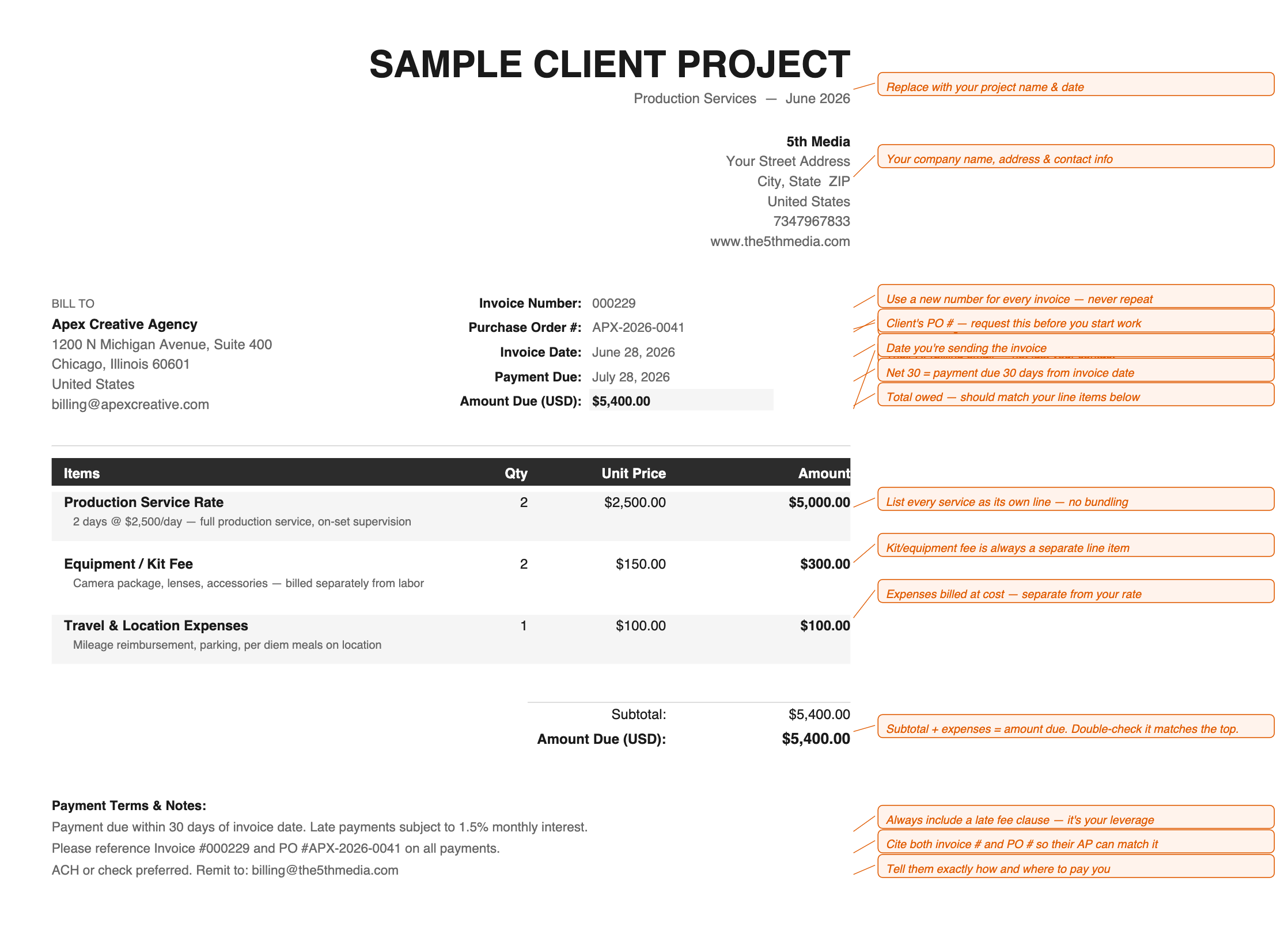

Keep in mind there is more than one correct way to do this, but this is what works for me.
Two minutes at booking saves you twenty minutes of frustration at billing.
If this was useful, subscribe. There’s more where this came from.
Yes! This is great. I'll add that for production clients, I also have a contract with a project outline or "scope of work" attachment that includes this info and payment terms. AND I track my "Accounts Receivable" or invoice payments that are coming in through a spreadsheet with date, invoice #, project + client name, and payment method.